Prompt Caching Patterns for Long Running AI Agents
Press Space for next Tweet
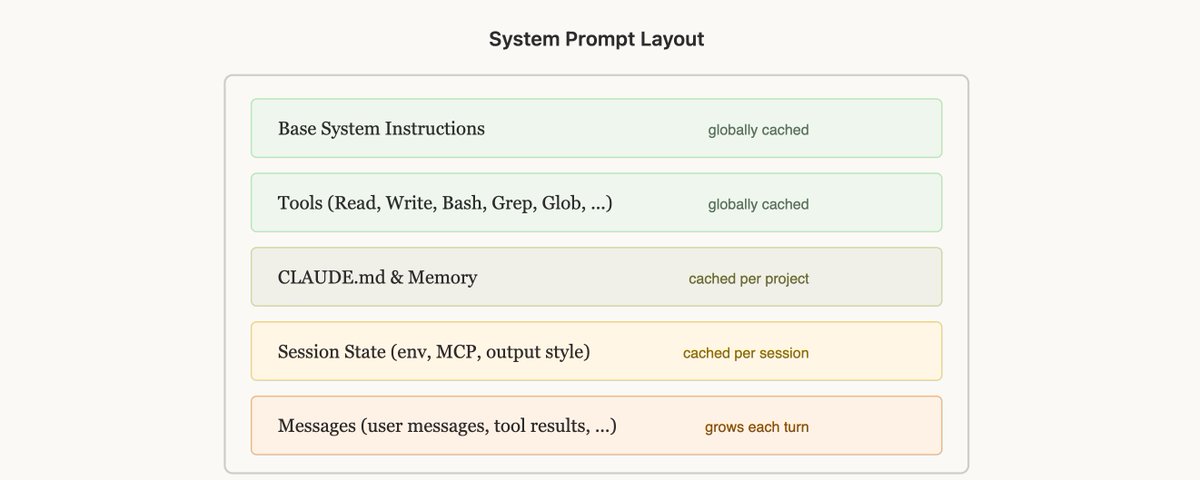
π Lessons from Building Claude Code: Prompt Caching Is Everything It is often said in engineering that "Cache Rules Everything Around Me", and the same rule holds for agents. Long running agentic products like Claude Code are made feasible by prompt caching which allows us to reuse computation from previous roundtrips and significant decrease latency and cost. What is prompt caching, how does it work and how do you implement it technically? Read more in @RLanceMartin's piece on prompt caching and our new auto-caching launch. At Claude Code, we build our entire harness around prompt caching. A high prompt cache hit rate decreases costs and helps us create more generous rate limits for our subscription plans, so we run alerts on our prompt cache hit rate and declare SEVs if they're too low. These are the (often unintuitive) lessons we've learned from optimizing prompt caching at scale. Lay Out Your System Prompt for Caching Prompt caching works by prefix matching β the API caches everything from the start of the request up to each cache_control breakpoint. This means the order you put things in matters enormously, you want as many of your requests to share a prefix as possible. The best way to do this is static content first, dynamic content last. For Claude Code this looks like: Static system prompt & Tools (globally cached) Claude.MD (cached within a project) Session context (cached within a session) Conversation messages This way we maximize how many sessions share cache hits. But this can be surprisingly fragile! Examples of reasons weβve broken this ordering before include: putting an in-depth timestamp in the static system prompt, shuffling tool order definitions non-deterministically, updating parameters of tools (e.g. what agents the AgentTool can call), etc. Use System Messages for Updates There may be times when the information you put in your system prompt becomes out of date, for example if you have the time or if the user changes a file. It may be tempting to update the system prompt, but that would result in a cache miss and could end up being quite expensive for the user. Instead, consider sending a system message in the next turn with the updated information for the model (e.g. it is now Wednesday), which would preserve the cache. Don't change Models Mid-Session Prompt caches are unique to models and this can make the math of prompt caching quite unintuitive. If you're 100k tokens into a conversation with Opus and want to ask a question that is fairly easy to answer, it would actually be more expensive to switch to Haiku than to have Opus answer, because we would need to rebuild the prompt cache for Haiku. If you need to switch models, the best way to do it is with subagents, where Opus would prepare a "handoff" message to another model on the task that it needs done. We do this often with the Explore agents in Claude Code which use Haiku. Never Add or Remove Tools Mid-Session Changing the tool set in the middle of a conversation is one of the most common ways people break prompt caching. It seems intuitive β you should only give the model tools you think it needs right now. But because tools are part of the cached prefix, adding or removing a tool invalidates the cache for the entire conversation. Plan Mode β Design Around the Cache Plan mode is a great example of designing features around caching constraints. The intuitive approach would be: when the user enters plan mode, swap out the tool set to only include read-only tools. But that would break the cache. Instead, we keep all tools in the request at all times and use EnterPlanMode and ExitPlanMode as tools themselves. When the user toggles plan mode on, the agent gets a system message explaining that it's in plan mode and what the instructions are β explore the codebase, don't edit files, call ExitPlanMode when the plan is complete. The tool definitions never change. This has a bonus benefit: because EnterPlanMode is a tool the model can call itself, it can autonomously enter plan mode when it detects a hard problem, without any cache break. Tool Search β Defer Instead of Remove The same principle applies to our tool search feature. Claude Code can have dozens of MCP tools loaded, and including all of them in every request would be expensive. But removing them mid-conversation would break the cache. Our solution: defer_loading. Instead of removing tools, we send lightweight stubs β just the tool name, with defer_loading: true β that the model can "discover" via a ToolSearch tool when needed. The full tool schemas are only loaded when the model selects them. This keeps the cached prefix stable: the same stubs are always present in the same order. Luckily you can use the tool search tool through our API to simplify this. Forking Context β Compaction Compaction is what happens when you run out of the context window. We summarize the conversation so far and continue a new session with that summary. Surprisingly, compaction has many edge cases with prompt caching that can be unintuitive. In particular, when we compact we need to send the entire conversation to the model to generate a summary. If this is a separate API call with a different system prompt and no tools (which is the simple implementation), the cached prefix from the main conversation doesn't match at all. You pay full price for all those input tokens, drastically increasing the cost for the user. The Solution β Cache-Safe Forking When we run compaction, we use the exact same system prompt, user context, system context, and tool definitions as the parent conversation. We prepend the parent's conversation messages, then append the compaction prompt as a new user message at the end. From the API's perspective, this request looks nearly identical to the parent's last request β same prefix, same tools, same history β so the cached prefix is reused. The only new tokens are the compaction prompt itself. This does mean however that we need to save a "compaction buffer" so that we have enough room in the context window to include the compact message and the summary output tokens. Compaction is tricky but luckily, you don't need to learn these lessons yourself β based on our learnings from Claude Code we built compaction directly into the API, so you can apply these patterns in your own applications. Lessons Learned Prompt caching is a prefix match. Any change anywhere in the prefix invalidates everything after it. Design your entire system around this constraint. Get the ordering right and most of the caching works for free. Use system messages instead of system prompt changes. You may be tempted to edit the system prompt to do things like entering plan mode, changing the date, etc. but it would actually be better to insert these as system messages during the conversation. Don't change tools or models mid-conversation. Use tools to model state transitions (like plan mode) rather than changing the tool set. Defer tool loading instead of removing tools. Monitor your cache hit rate like you monitor uptime. We alert on cache breaks and treat them as incidents. A few percentage points of cache miss rate can dramatically affect cost and latency. Fork operations need to share the parent's prefix. If you need to run a side computation (compaction, summarization, skill execution), use identical cache-safe parameters so you get cache hits on the parent's prefix. Claude Code is built around prompt caching from day one, you should do the same if youβre building an agent. http://x.com/i/article/20245434920648826β¦

Topics
Read the stories that matter.The stories and ideas that actually matter.
Save hours a day in 5 minutesTurn hours of scrolling into a five minute read.