AI Typography Presets Using Google Nano Banana Model
Press Space for next Tweet
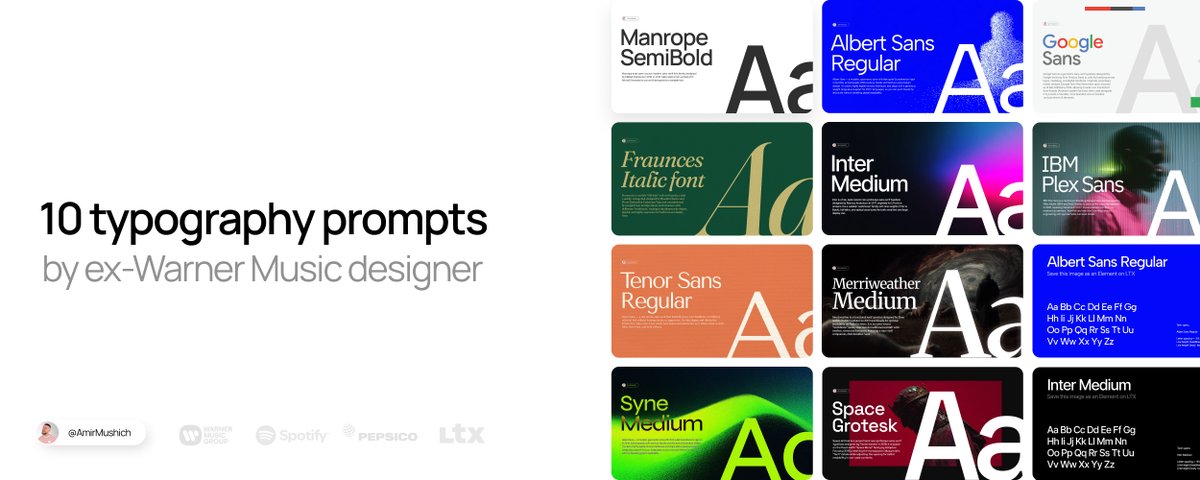
📝 10 AI presets to make your brand look elite (prompts + assets) INTRO Bad font design ruin any brand in 0.3 seconds. Thats what I learned (and 1,000,000s of brand owners, too). Wrong type selection + default settings = your brand looks like trash *This article is sponsored by LTX Studio. Thanks to the LTX team for supporting this post and my work for you. I spent 10+ years crafting design & typography for big & small clients:from mastodons like Warner Music, PepsiCo, Spotify to a local coffeeshops. Fonts are magical items: they can elevate a simple brand design to a word-class level and they can ruin even a pro-tier work if they look like sh*t. Now I’m giving you the exact same premium look the top brands use: without Figma, Photoshop, or years of practice. 3 TOOLS YOU NEED: Google Nano Banana - for visual generation, LTX Elements - for font consisttency & workflow organization, 10 prompts below - to make your brand look good. Change only [YOUR TEXT] → get pro-level type instantly. Save this article. Use it forever. WORKFLOW (how it works) How this works in 4 steps: Access Google Nano Banana model (I use LTX -> GenSpace for convenience & organzation) Select or upload your font as Element for consistency (Grab my pre-made JPEG files saved in Elements - all the links below) Copy my preset-prompts → replace only [INSERT YOUR TEXT] Generate → enjoy your consistent font designs Why LTX Elements make all the difference I tested the same prompts on a “clean” Nano Banana model without Elements: ❌ Consistency drops dramatically Model almost always draws Bold instead of Semibold Kerning is ignored or inaccurate Frequent hallucinations (extra/missing text pieces) With Elements, adherence jumps +80–90% And the workflow is simple: upload font as Element → tag it in prompt. This is why all 10 templates are built around this feature. It’s the difference between genAI and advanced AI typography. 10 TYPOGRAPHIC PROMPTS (copy & paste) Repeat this format 10 times – each one short & scannable How to use these prompts: 1. Copy paste it to Nano Banana 2. Replace the "INSERT YOUR TEXT HERE" with your text 3. Change colors (type it in or use Color Picker [Alt + P] in LTX) 4. Hit "Generate" and enjoy the results 1. MANROPE Clarity & confidence This is the font I use for in my social media designs. I use Manrope SemiBold for headlines and Manrope Regular for body text to achieve a proper visual hierarchy. Good fit for: Digital products and interfaces, branding for tech, SaaS, and contemporary lifestyle companies. Why: Strong on‑screen legibility; clean, confident tone. Clean, geometric letterforms with minimal stroke contrast give it a contemporary, tech‑friendly feel. PROMPT: Generate with my customized template 🔽 https://amirmushich.link/ai-fonts How to use this template 👆 Download my Elements (as images) from this project Upload them into your LTX Project as Your Elements Copy my prompts from the LTX Project Paste the prompt into your project → tag the uploaded Element with @[ELEMENT NAME] Generate consistent typography → repeat with all the prompts 👇 2. FRAUNCES Premium, "Old money" style For: Branding and logos that want a classic serif voice with a warm, offbeat personality (e.g., heritage, food, or friendly fintech/“saucy” business vibes). Why: Headlines, hero sections, and editorial layouts where expressive typography does the storytelling. PROMPT: Generate with my customized template 🔽 https://amirmushich.link/ai-fonts 3. SYNE Artsier, experimental geometric sans Fits for: Cultural institutions, creative studios, posters, and edgy editorial layouts. Why: Condensed, graphic shapes and bold weights create a strong, contemporary “art center” voice at display sizes. PROMPT: Generate with my customized template 🔽 https://amirmushich.link/ai-fonts 4. INTER System, product and UI workhorse Fits for: Apps, dashboards, documentation, and any digital product needing maximum clarity. Why: Neutral, highly readable at small sizes with a huge weight range and excellent language/feature support. PROMPT: Generate with my customized template 🔽 https://amirmushich.link/ai-fonts 5. ALBERT SANS Friendly, modern grotesque sans Fits for: Startups, lifestyle brands, landing pages, and simple marketing sites. Why: Soft, approachable shapes make it feel less corporate than strict neo‑grotesques while staying versatile. PROMPT: Generate with my customized template 🔽 https://amirmushich.link/ai-fonts 6. MERRIWEATHER Screen‑optimized classic serif Fits for: Blogs, news sites, long‑form reading, and editorial platforms. Why: Large x‑height and sturdy forms keep paragraphs comfortable and readable, especially on digital displays. PROMPT: Generate with my customized template 🔽 https://amirmushich.link/ai-fonts 7. TENOR SANS Refined, editorial sans Fits for: Magazines, minimalist brands, and content‑heavy layouts with a sophisticated tone. Why: Narrow proportions and subtle personality work well for headlines and shorter text with an editorial feel. PROMPT: Generate with my customized template 🔽 https://amirmushich.link/ai-fonts 8. SPACE GROTESK Techy, retro‑futuristic sans Fits for: Developer tools, Web3/crypto, tech startups, and data‑driven interfaces. Why: Inherits “code” DNA from Space Mono, giving a distinctive digital character that pops in headlines and UI. PROMPT: Generate with my customized template 🔽 https://amirmushich.link/ai-fonts 9. GOOGLE SANS Branded, geometric‑humanist Google look Fits for: Product and marketing sites that want a clean, “big tech” aesthetic. Why: Rounded, geometric forms feel friendly and modern, great for bold headings and hero copy. PROMPT: Generate with my customized template 🔽 https://amirmushich.link/ai-fonts 10. IBM PLEX SANS Corporate, engineered humanist sans Fits for: Enterprise products, design systems, documentation, and tech brands. Why: Built for IBM’s ecosystem, it balances technical precision with human warmth and scales well from UI to brand. PROMPT: Generate with my customized template 🔽 https://amirmushich.link/ai-fonts THE MAGIC OF DETAILS The settings I calculated for you aren’t random numbers - they’re your key for premium typography. Here’s how it works: Tracking / Kerning - Negative values (-3% to -7%) in headlines create tight, luxurious spacing. Leading - 0.8–0.9 for headlines adds blocky and solid sense, making the headline a strong design element. Google Fonts choice - All free, web-safe, high-quality fonts I’ve battle-tested in real campaigns for years. Colors & alignment - not mandatory choices, but catchy, high contrast and hooky for many cases. PRO TIP: Custom colors - made easy: In my prompts I use HEX codes (#000000, #FFFFFF etc.) so you can copy-paste exactly. But inside LTX prompt window there’s a better way: Built-in Color Picker • Click the color field → opens visual selector • Use eyedropper tool → pick any color directly from your browser/screen • No need to hunt HEX codes - just point & click Repeat these 2 steps: DESIGN & FINE TUNE YOUR CONTENT: It’s time to design your content & make final polish steps to make it look great. Let’s do it 👇 Overlay your text on an image: follow these simple steps + copy the prompt below PROMPT: Upscale your images for better quality: This is it: Your premium content is ready to go live! BONUS 🎁 Free bonus: massive pack of asstes for $0 Free font pairings - curated by me Royalty free music track - with license for commercial use Pack of video transitions Pack of prompts for video creators Media kit template - to help you land clients Get your pack here: https://amirmushich.link/freebies This is the exact typography workflows I use myself. Now it’s yours - no gatekeeping. Save this article as your font cheat-sheet. Follow @AmirMushich for more articles & workflows Next article: Building brand guidelines with AI Turn on notifications on my profile 🔔 http://x.com/i/article/20224087550281400…

Topics
Read the stories that matter.The stories and ideas that actually matter.
Save hours a day in 5 minutesTurn hours of scrolling into a five minute read.