Home Network Security Risks When Running Clawdbot
Press Space for next Tweet
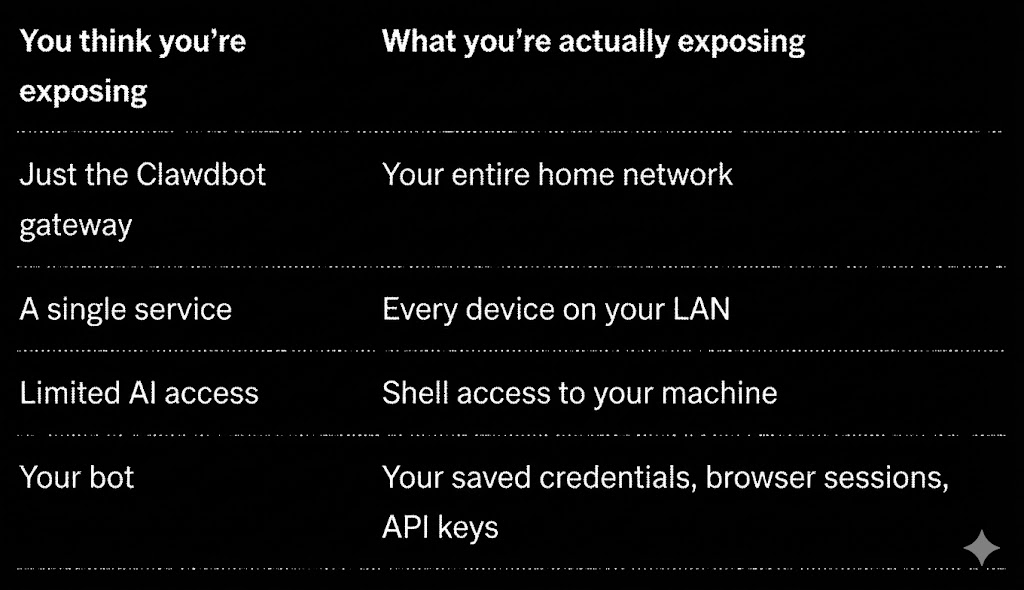
Stop Exposing Your Home Network to the Internet People are running Clawdbot on their Mac mini at home and exposing it to the public internet. This is a massive security risk that most don't even realize they're taking. ## Here's what's actually happening: When you run Clawdbot locally and open it to the internet, you're essentially putting a door on your home network that anyone can try to walk through. Bad actors • Can connect to your local machine • Access other devices on your network, use any services or credentials you've connected to that machine • Pivot to your personal files, saved passwords, and connected accounts. This isn't theoretical. Security researchers are already finding exposed Clawdbot gateways using Shodan (a search engine for internet-connected devices). They're finding • Open shell access • Browser automation endpoints • Exposed API keys • Zero authentication. ## What's Actually at Risk Let's be specific about what you're exposing when you run this on your home network. Your Mac mini isn't isolated. It's connected to your router, your NAS, your smart home devices, your other computers. One entry point compromises everything. ## The Fix: Host It Somewhere Else The solution is simple: don't run it on your home network. Instead, spin up a cheap server ($5-30/month) with a cloud provider. This gives you • Isolation (if something goes wrong, it's contained to that server), • No home network exposure (bad actors can't pivot to your personal devices) • Zero trust by default (the server has access to nothing except what you explicitly give it), • Cheaper than a Mac mini (a $6/month droplet vs a $500+ machine). ## How to Set This Up (The Easy Way) You don't need to be a sysadmin. Here's the flow: Step 1: Get a Server - Pick any provider DigitalOcean, Hetzner, Linode etc... - Create an Ubuntu 22.04 instance. Smallest size is fine ($5-6/month). You'll get an IP address and root password (or SSH key). Step 2: Provide the BLACKBOX remote cloud agent access. This is where it gets easy. Open BLACKBOX remote agent and give it SSH access to your new server. Then run this prompt: Blackbox Remote Agent Cloud > "Create a single idempotent Ubuntu hardening + Clawdbot install script. Goal: Securely install Clawdbot on a fresh Ubuntu 22.04 VPS with Docker-based install, gateway binds to loopback or Tailnet only (NOT public), auth mode=password with a strong password (read from env, do not echo), access only via Tailscale Serve or SSH tunnel (no public ports), UFW enabled allowing OpenSSH and Tailscale while blocking everything else, channel allowlist and dmPolicy not open (pairing/allowlist), non-root user for running Clawdbot, Fail2ban for SSH brute force protection, unattended security updates enabled, log rotation configured, and a clawdbot doctor check that prints warnings. Output install_and_harden.sh (idempotent), docker-compose.yml, config template, README with one-line command and required env vars, and uninstall/rollback instructions. Constraints: no secrets committed to git, scripts must be safe-by-default, must be reversible." BLACKBOX will SSH in, set everything up, and hand you back a secured server. Step 3: Connect via Tailscale Install Tailscale on your phone or laptop and connect to your server through the Tailnet. You now have a Clawdbot instance that is not exposed to the public internet, requires authentication, is isolated from your home network, and can only be accessed through your encrypted Tailscale connection. ## What BLACKBOX Actually Configures When you run that prompt, here's what gets set up: ## Still Want to Run It Locally? If you absolutely must run Clawdbot on your home network, at minimum: Never expose ports to the internet (use Tailscale or Cloudflare Tunnel). Enable authentication with a strong password, not the default. Set up allowlists with only your Telegram ID. Firewall everything and block all incoming connections except what's necessary. Isolate the machine on a VLAN or separate network segment. Monitor access by logging everything and setting up alerts. TL;DR Don't run Clawdbot on your home network. The security researchers are already scanning. Don't be the person they find.
Topics
Read the stories that matter.The stories and ideas that actually matter.
Save hours a day in 5 minutesTurn hours of scrolling into a five minute read.